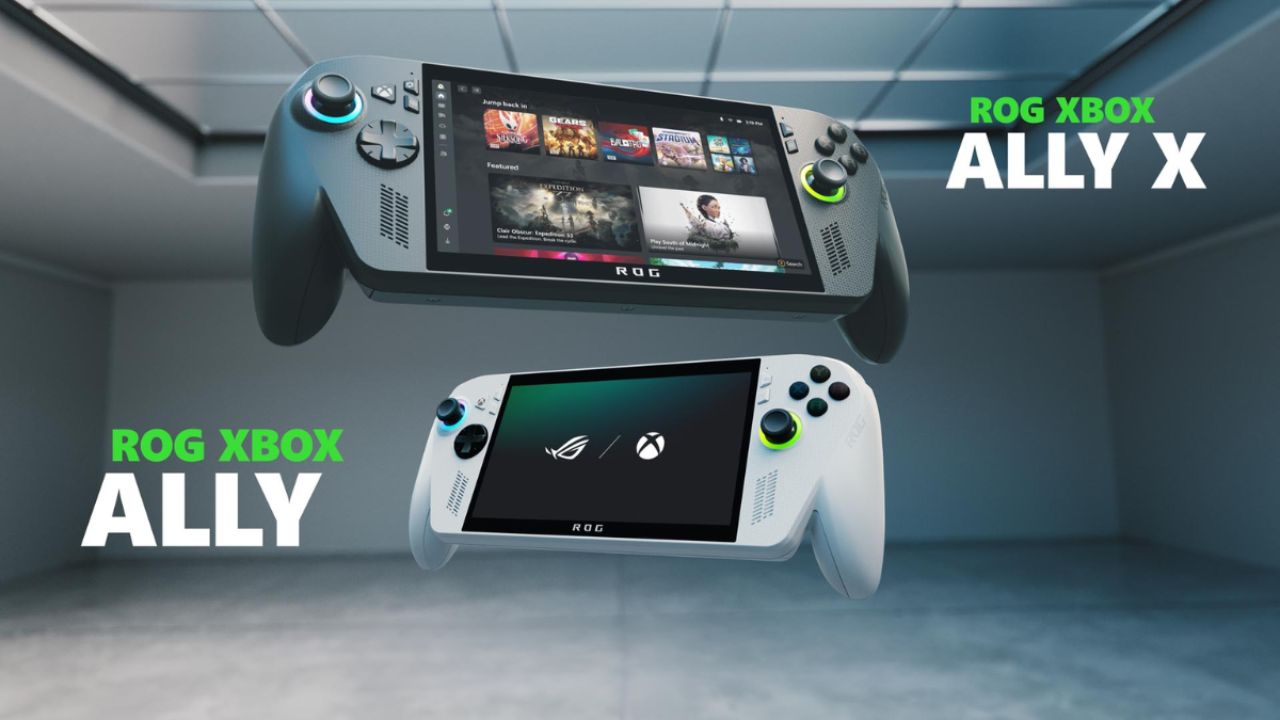
If you’ve ever wished you could take your Xbox anywhere you go — in a train, on a trip, or just to bed — well, that dream might finally be real. Xbox and Asus have teamed up to create something that’s got the entire gaming community talking: the Xbox Ally X, a handheld console that combines Asus’s powerful ROG hardware with the simple, console-like experience of Xbox.
When I first heard about this collab, I honestly thought — “Wait, is this just a rebranded ROG Ally with an Xbox logo?” But after spending a few days gaming on it, testing everything from heavy AAA titles to chill indie games, my thoughts have definitely evolved. So, let’s talk about what this device actually feels like, performs like, and whether it truly lives up to the hype.
First Impressions: A Familiar Yet Fresh Design
At first glance, the Xbox Ally X looks very familiar — almost identical to the ROG Ally. The body is made of lightweight plastic, which helps keep the weight manageable at around 715 grams. That might sound heavy, but in hand, it feels surprisingly balanced.
What really impressed me are the ergonomic hand grips. Asus clearly took inspiration from the classic Xbox controller design — the texture, the curves, even the button placement feels instantly familiar. For long gaming sessions, this is a blessing. The texture can feel a little odd if your hands get sweaty, but it’s not a dealbreaker.
It’s definitely chunkier than a Nintendo Switch, but it feels way more premium and powerful. It’s like holding an Xbox controller that happens to have a whole gaming PC built inside.
Hardware Powerhouse in Your Hands
Under the hood, this handheld is no joke. The AMD Z2 Extreme chip paired with 24GB of RAM gives it serious firepower. You can choose between the Xbox Ally X (the higher-end version I tested) and the regular Xbox Ally, which comes with a slightly less powerful APU and less RAM.
If you’re into performance, the X version is the one to go for. But yeah, it’s pricier too. Still, the performance gap between these two models is noticeable in heavy games like Battlefield 6 or Cyberpunk 2077.
You also get two USB-C ports, a microSD slot for expandable storage, and support for third-party chargers — a small but genuinely useful touch. The 65W charger it comes with is tiny and easy to carry around, so you won’t be tied to bulky cables.
The Display : Small but Mighty
Now let’s talk about the screen — because that’s where most handhelds either shine or flop. The Xbox Ally X sports a 7-inch Full HD display with a 120Hz refresh rate. It’s not OLED (and yes, I wish it was), but it’s still a gorgeous panel for its size.
Colors pop beautifully, text looks sharp, and that 120Hz refresh rate makes everything buttery smooth. The display gets up to 500 nits brightness, so you can comfortably use it outdoors. It’s a glossy screen, but it has an anti-reflective coating that cuts glare decently well.
For a handheld device, this screen feels immersive — like you’re holding a mini Xbox experience in your palms.
Sound That Surprises You
Now, this might sound exaggerated, but the speakers on this thing are absolutely insane. I’ve tried several handhelds, and even some gaming laptops, and I’ve rarely heard such clear, loud, and bass-rich sound.
There’s also a kind of surround sound simulation, so when you’re playing FPS games like Battlefield or Halo, you can actually tell where the enemies are. For players who don’t want to wear headphones all the time, this is a game-changer.
It’s one of those little things that makes you fall in love with a gadget.
Xbox Simplicity Meets Windows Power
Now, let’s get to the part that defines this collab — the software experience.
See, one of the biggest problems with handheld gaming PCs has always been Windows. It’s great for flexibility but clunky for couch gaming. You don’t want to fumble with touchscreens and menus when all you want is to hit “Play”.
That’s where the Xbox OS mode comes in. When you boot up the Xbox Ally X, it launches into a clean, Xbox-style interface. It looks and feels like an Xbox console menu — fast, responsive, and simple.
But here’s the clever part: it’s actually Windows 11 underneath, just with all the extra desktop clutter turned off. If you want, you can switch back to full Windows mode anytime. This dual setup means you get the best of both worlds — console-like simplicity and PC-like freedom.
You can install Steam, Epic, or any game launcher you like, then switch back to Xbox mode to enjoy a minimal interface. It’s honestly quite smooth, though sometimes the inputs get lost and you have to use the touchscreen — a small hiccup in an otherwise solid experience.
Gaming Performance: Real-World Results
Alright, let’s talk performance because that’s what matters most. In benchmarks, the Xbox Ally X scores close to top-tier 2024 gaming laptops. But raw numbers only tell half the story. In real gameplay, it’s even more impressive — especially when plugged in.
The device has three performance modes — Silent, Performance, and Turbo. Turbo mode gives you maximum FPS and smoothness, but naturally drains the battery faster. In heavy games like Battlefield 6, you can get a solid two hours on battery, which is honestly not bad.
Switching to Performance mode balances power and efficiency, perfect for mid-tier games like Battlefield 1 or Forza Horizon 4. For lighter titles like Terraria or Stardew Valley, Silent mode gives you almost five hours of battery life — that’s a big win for casual gaming. It’s smartly tuned, and depending on what you play, you can easily stretch your sessions.
Battery, Cooling, and Comfort
Battery life is always a tradeoff in handhelds. The Xbox Ally X manages it well — it’s no Steam Deck killer in endurance, but it’s way more powerful.
The cooling system deserves special mention. Even during heavy gameplay, the console barely gets warm where your hands rest. Heat stays concentrated in the middle, and the fans are impressively quiet. You can game in a public place without anyone giving you weird looks.
So yes, it stays cool, quiet, and comfortable, which is exactly what you want from a device you’ll be holding for hours.
Upgrade Options and Pricing in India
Now, let’s talk about something Indian gamers care deeply about — pricing and value.
The Xbox Ally X doesn’t come cheap. It’s definitely in premium handheld territory, costing roughly twice as much as a standard console. The regular Xbox Ally is more affordable, though slower, and feels more in line with mainstream console prices.
But here’s the twist — this isn’t just a console. It’s a full Windows PC. You can connect a monitor, keyboard, and mouse, and boom — it becomes a small desktop. It even has a replaceable SSD, so if you’re comfortable with a screwdriver, you can upgrade your storage.
So yes, it’s expensive — but it also does more than any traditional console ever could.
Who Is It Really For?
That’s the million-rupee question, right?
If you’re a console gamer who loves the Xbox ecosystem, this device feels like home. You’ll get instant access to Game Pass, Xbox Cloud saves, and that classic controller feel.
If you’re a PC gamer, this can be a fun second device — something to play your Steam or Xbox games while you’re away from your desk. But you’ll need to get used to using a controller. For someone like me, who still misses the precision of a mouse in FPS games, that’s the only real drawback.
Final Verdict: A Near-Perfect Blend of Power and Play
After using the Xbox Ally X for a while, here’s my honest take — it’s probably the best handheld gaming experience you can buy right now. It’s not cheap, and it’s not perfect, but it strikes an amazing balance between performance, design, and versatility. It’s powerful enough to run AAA games smoothly, simple enough to feel like a console, and flexible enough to replace a lightweight gaming laptop.
If you’re someone who travels often or just wants to chill on the couch and play Halo without firing up your big PC setup — you’ll love this. But if you’re on a tighter budget, the regular Xbox Ally is still an excellent pick. For me, this collaboration between Xbox and Asus isn’t just about slapping two logos together. It’s about creating a device that bridges the gap between PC and console gaming — and honestly, they’ve done it beautifully.