I’ll be honest — this isn’t going to be one of those fancy scripted reviews. I didn’t plan to make a perfect tech video or read out a bunch of specs. I simply wanted to share what it actually feels like to unbox and use the Samsung Galaxy XR for the first time, as someone who’s just curious and genuinely excited about this whole “mixed reality” thing.So, if you’ve been wondering what Samsung’s answer to the Apple Vision Pro is really like in everyday use, grab a cup of chai — let’s talk.
Unboxing Galaxy XR : That First Peek Inside
The moment you open the Galaxy XR box, it feels special. Samsung’s presentation is clean — right on top sits the headset itself, looking futuristic but somehow approachable. Beneath it, you get a bunch of accessories: a slim and thick strap, light filters, a power brick, and a USB-C to USB-C cable that’s long enough to give you freedom to move around.
There’s also a polishing cloth — Samsung’s fun little answer to Apple’s famous “polishing cloth” joke. You even get a compact carrying case, which feels soft and pillowy with a big rope strap attached to it. Inside, there’s space for the headset, controllers, and accessories, all neatly arranged.
It’s clear from the start — Samsung wants you to feel like this is a complete experience, not just another gadget.
First Look at the Galaxy XR
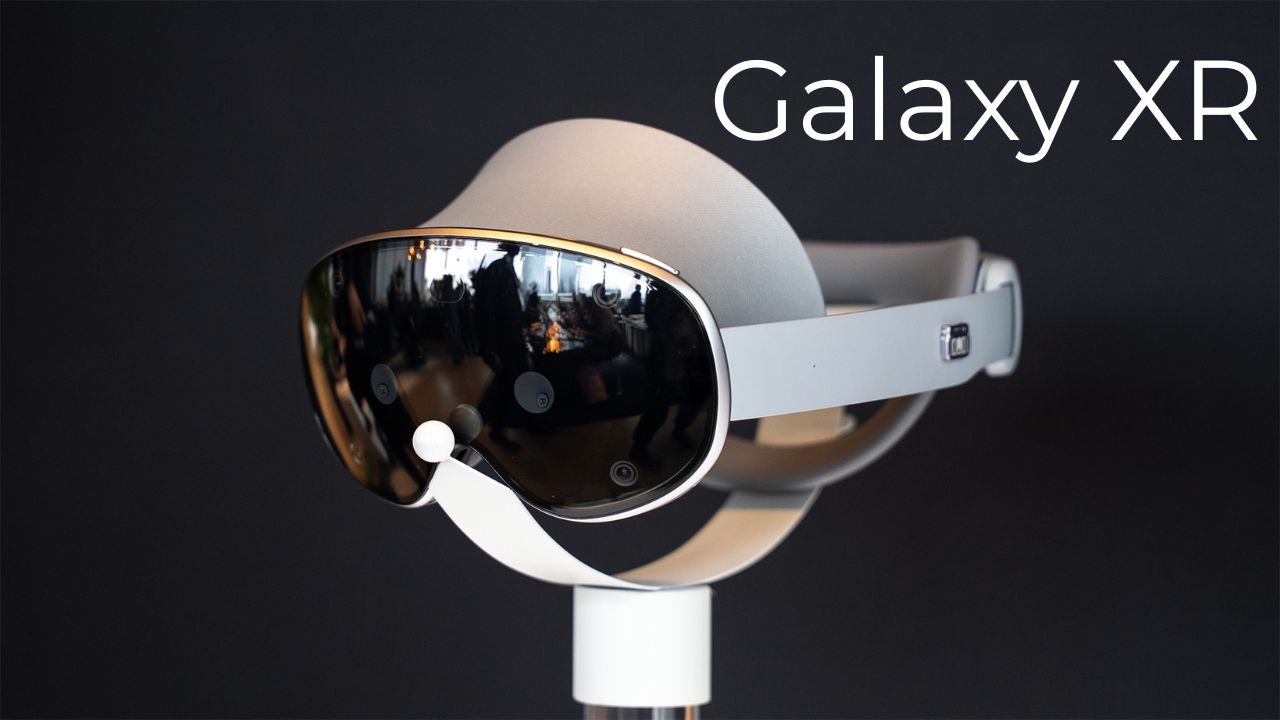
Once you take off the front cover, the Galaxy XR really looks like something from the future. The front glass hides multiple cameras and sensors, and at the top, you have a power and volume button. There’s also a touchpad on the side for quick gestures.
Inside, the dual 4K 90Hz micro-OLED displays shine bright — literally. They look crisp and immersive the moment you power it on.
The comfort part is handled with a tightening wheel at the back, which you can turn left or right to adjust the fit. It’s surprisingly easy, and once you get it right, it doesn’t feel bulky at all.
Powering Up the Galaxy XR
The device runs off a small external power brick, which you can slip into your pocket. The cable is braided, with a secure metal end that locks into place so it won’t slip out. It’s a clever setup — a bit old-school, maybe, but it works.
As soon as I powered it on, the headset automatically adjusted its lenses to fit my eyes. That little movement inside felt almost alive. Then came the setup screen, floating right in front of me in mixed reality.
It’s wild — you can see your real room, but also see menus, text, and floating icons layered over it. It’s like living inside a tech dream.
Setting It Up: Simple and Surprisingly Fun
The Galaxy XR pairs with your Samsung phone through a QR code. Within seconds, it syncs, and you can start customizing your view.
You can choose between hand-only control or hand and eye tracking. I started with just hand control — and it’s shockingly smooth. You simply point your hand, then pinch your thumb and index finger to select. It feels natural, almost like your fingers become a mouse.
When I opened YouTube, it popped up as a massive floating window in front of me. I could literally drag it anywhere around my room — left wall, ceiling, wherever. Want it bigger? Just grab the corner and stretch. Within seconds, I had a 200-inch screen playing my favorite video, floating above my dining table. If you’ve ever dreamed of having a home theatre in your bedroom — this is it.
Living in Mixed Reality
The pass-through cameras on the Galaxy XR are genuinely impressive. You can see your real-world surroundings with digital overlays on top. It’s almost eerie how well it blends virtual and real life.
For example, I opened Google Maps in one floating window, YouTube on another, and the Play Store on the right. I could walk around, glance at each one, and even move them with hand gestures.
When I zoomed into New York City in 3D using Maps, I could explore streets and buildings like I was flying above them. Samsung calls this “immersive mode,” and it truly feels like teleportation.
Testing the Apps: Android in Galaxy XR
This is where Samsung shines. Since the Galaxy XR runs on Android, you get access to the Google Play Store. I even tried launching my own Android game — and it worked perfectly.
The headset didn’t need any special version or updates; it just opened the app like a normal Android device. It’s moments like these that remind you how powerful and open this platform is compared to Apple’s ecosystem.
You can also connect a keyboard and mouse for a proper productivity setup — imagine working on a massive floating desktop anywhere in your house.
Photo Mode, Gemini AI, and Circle to Search
The headset also has a built-in camera. You can take quick snapshots, zoom in, and view them right inside your virtual space. The results are pretty neat for something that’s not meant to be a photography device.
And yes, it integrates Gemini AI — Google’s assistant for XR. Just hold the top button and ask, “Hey Gemini, tidy up my windows,” and it instantly arranges all your open apps neatly around you.
There’s also Circle to Search, which is one of my favourite features. You can look at something in the real world, circle it with your fingers, and the XR instantly searches the web for what you just saw. It feels magical — like the future we were promised years ago.
Immersive Mode: Escaping the Real World
Double-tap the touchpad, and suddenly you’re not in your room anymore. You’re standing on another planet or floating in a virtual world. It’s called Immersive View, and it’s breathtaking.
I tried watching YouTube videos in that mode — imagine sitting on Mars and streaming your favourite show. The colors pop, the clarity is unreal, and the sound feels rich and spatial.
Honestly, I could spend hours in there just exploring.
Comfort and Everyday Feel
One of the best things about the Galaxy XR is that it doesn’t feel heavy. I wore it for more than half an hour, and it didn’t strain my neck. Samsung clearly learned from earlier VR attempts like the old Gear VR.
You can even get prescription lenses from IBY Direct, though my left eye’s power was out of their supported range. Still, for most people, that’s a great touch — especially if you wear glasses.
The Real Question: Copy or Competition?
Let’s address the elephant in the room — yes, the Galaxy XR takes inspiration from Apple’s Vision Pro. But Samsung’s not new to this game. Remember the Gear VR days? They were experimenting with virtual reality long before Apple even entered the scene.
So, I wouldn’t call it a copy. I’d call it evolution — a solid Android answer to Apple’s ultra-premium headset, but at nearly half the price. And that’s where it wins. For Android users, it feels natural, flexible, and far more open.
Final Thoughts: The Beginning of Something Big
After spending some time with the Galaxy XR, I can confidently say this — it’s not just a gadget, it’s an experience. It’s like your screen broke free from your phone and decided to live in your room.
It’s not perfect yet. The ecosystem is still growing, and there’s room for smoother software updates and more XR-optimized apps. But as a first-gen Samsung mixed reality headset, it’s seriously impressive.
If you’re someone who loves exploring new tech before it becomes mainstream, you’ll love this. It’s futuristic, fun, and surprisingly usable in everyday life. So, would I recommend the Galaxy XR? Absolutely — if you’re curious, open-minded, and ready to see what the future of computing might actually feel like.